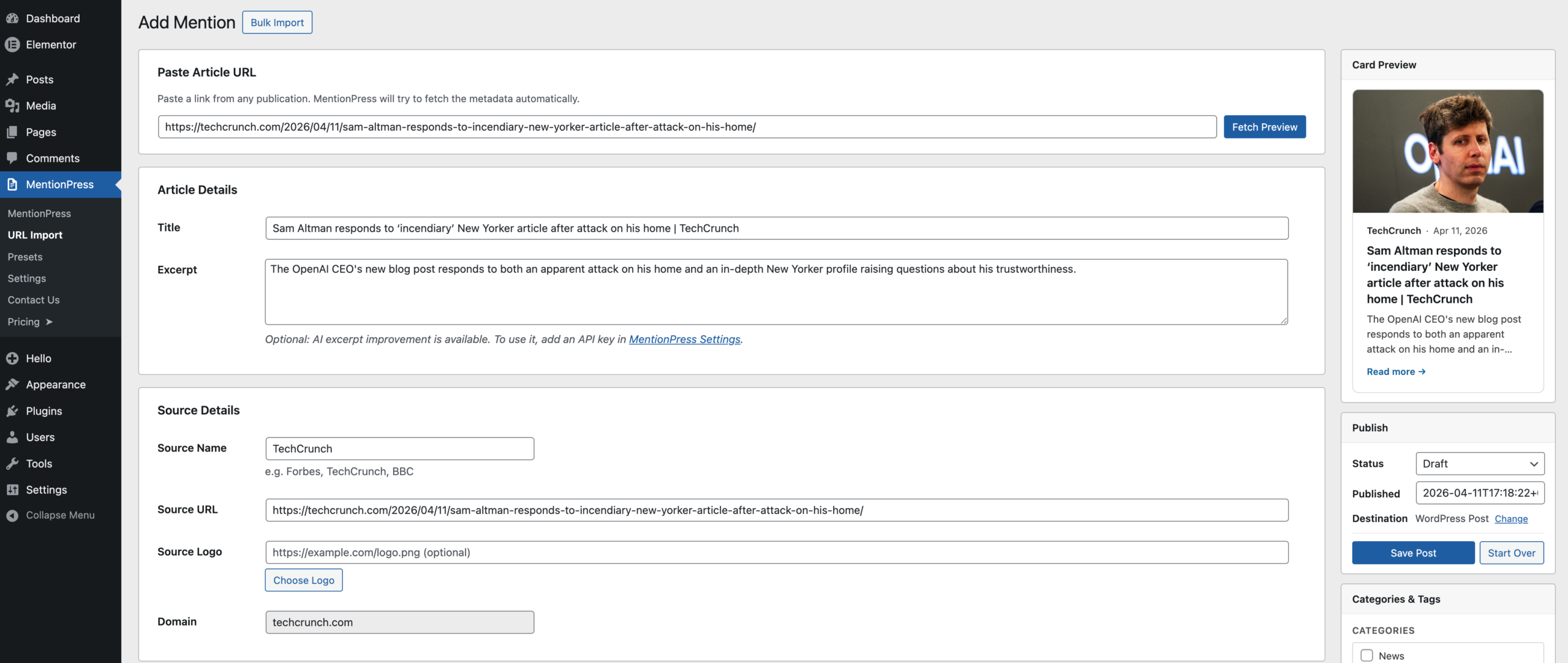
Turn media coverage into WordPress cards without the manual busywork
Paste a URL. Review the metadata. Publish. MentionPress is a straightforward WordPress plugin that turns press mentions and earned media links into clean, structured content. Built for founders, agencies, and consultants who want to keep their “As Seen In” sections updated without building custom ACF setups every time.
The problem with WordPress press pages
If you’ve ever maintained a media coverage page or an “As Seen In” section on a WordPress site, you know the typical workflow. It’s a repetitive, manual process.
The usual way:
- Open the article on Forbes, TechCrunch, or a niche industry blog.
- Manually create a new WordPress post.
- Copy and paste the article title and an excerpt.
- Download the featured image, resize it, and upload it to your media library.
- Type out the publication name, format the date, and make sure the external link opens in a new tab.
- Fiddle with an Elementor Loop Grid or block layout until the card looks right.
The MentionPress way:
- Click “Add Mention” in your WordPress dashboard.
- Paste the URL.
- MentionPress automatically pulls in the Open Graph data: the title, excerpt, featured image, publication name, and date.
- Review the preview, make any quick edits, and click Publish.
It takes a boring data-entry task and turns it into a fast, editorial review step.
A plugin designed to fit your existing workflow
MentionPress works because it focuses on simplifying the data import without trapping you in a rigid frontend layout.
Automatic metadata handling When you paste a link, the plugin fetches standard Open Graph tags. If the source didn’t write a great description, you can easily type your own summary before hitting save.
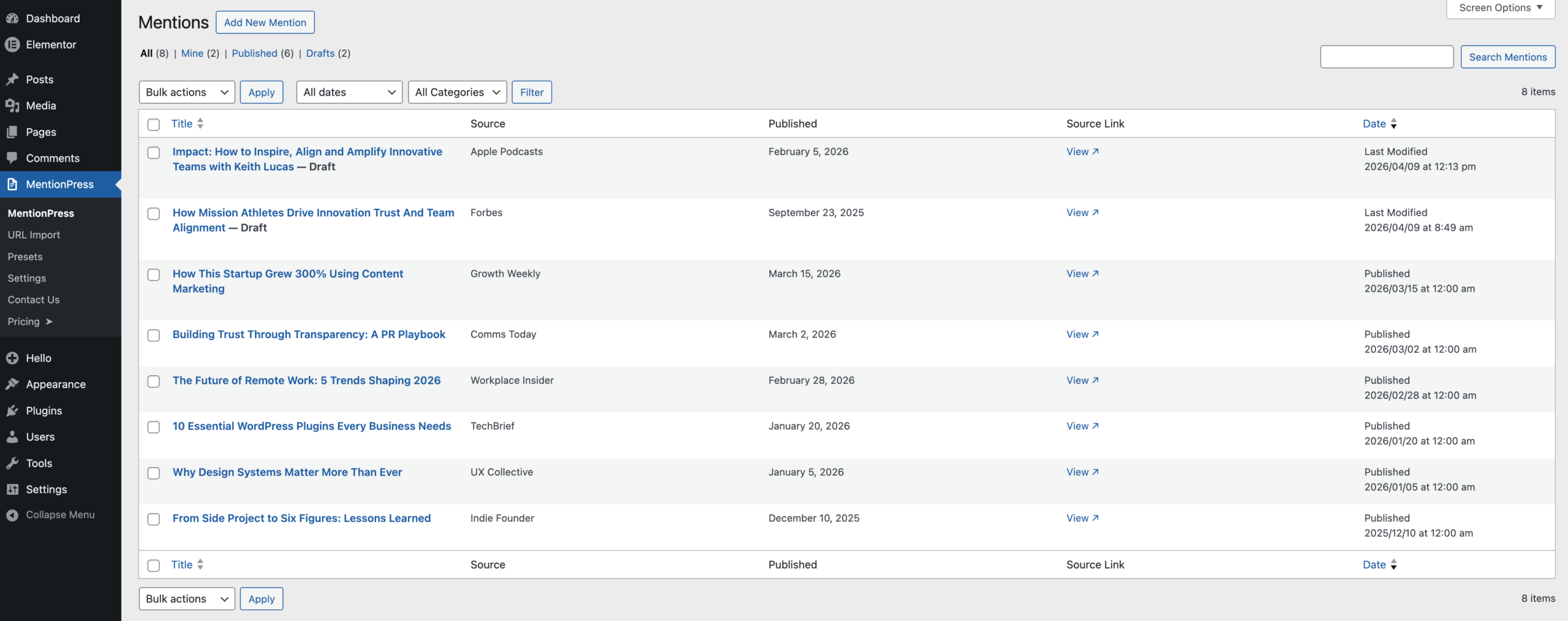
Three ways to store your data Every WordPress site is structured differently, so MentionPress gives you three content modes:
- Mention Item Mode: Keeps everything organized in a dedicated “Mentions” custom post type, keeping your core blog clean.
- Regular Post Mode: Saves your media coverage as standard WordPress posts—useful if you just want to drop them into an existing “News” category.
- Existing Posts Mode: If you already have dozens of press mentions published on your site, MentionPress can simply render them into its native grid without requiring you to re-import anything.
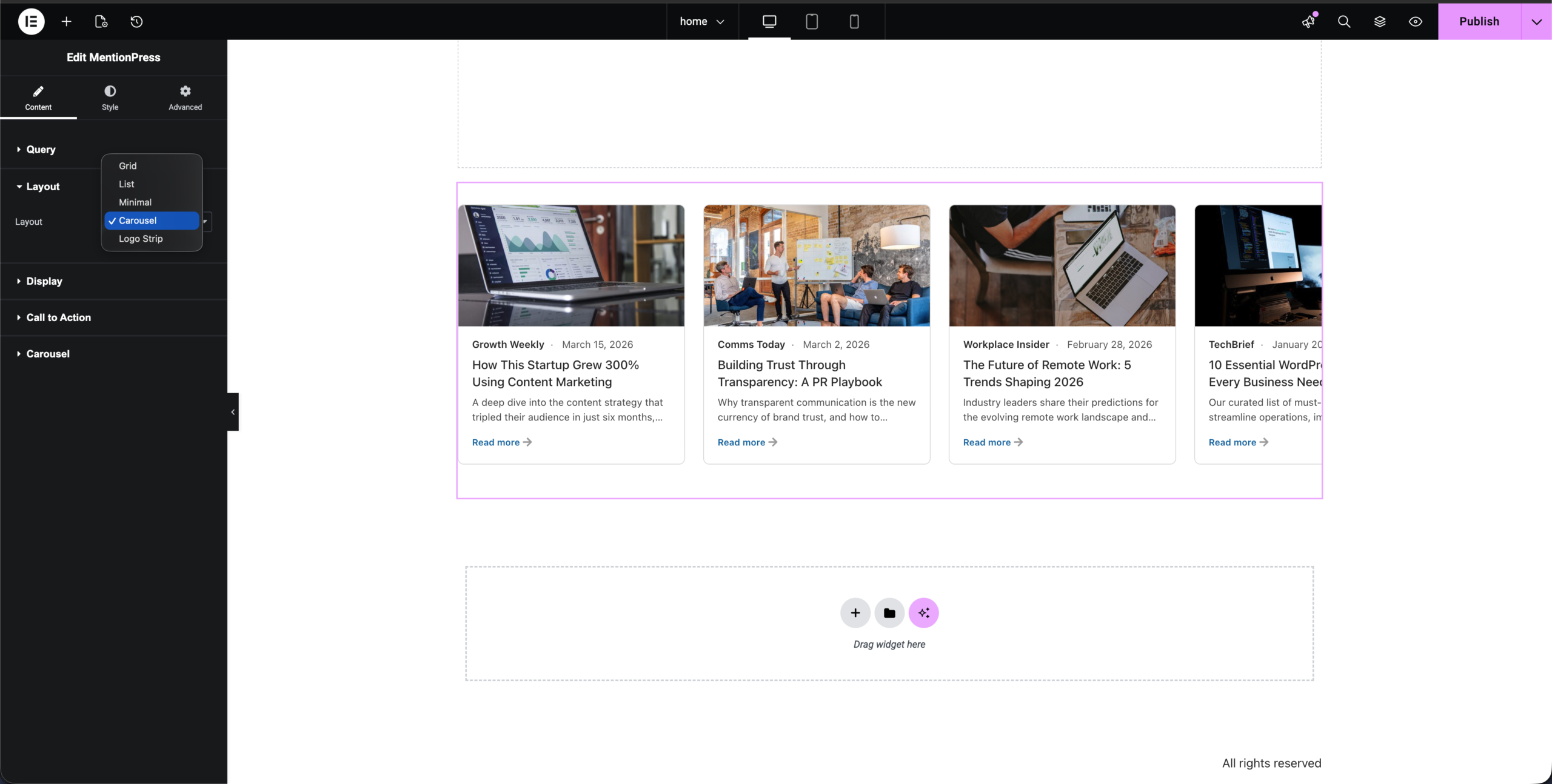
Gutenberg & Elementor support You can output your media coverage anywhere. Use the native Gutenberg block for a clean grid layout, or drop in the Elementor press mentions widget to integrate natively with your page builder.
Optional AI summaries If you want to highlight your specific contribution to an article rather than using the generic publisher meta description, MentionPress includes a “Bring Your Own Key” AI excerpt helper to rewrite the summary natively in the editor.
Who uses MentionPress?
This plugin is built for people and teams who actively manage credibility on the web:
- Agencies and freelancers: Spend less time on manual data entry and managing custom fields for client sites. Set up a reliable, repeatable press room workflow that clients can easily update themselves.
- Founders and startup teams: When your startup gets press, you want it on the site immediately. MentionPress lets you add an earned media feature in seconds without asking a developer to build a new loop.
- Consultants and personal brands: Authority sites run on trust. An “As Seen In” section builds credibility, but only if it’s kept current. This makes it trivial to add a new media mention the same day it goes live.
Choose an edition that fits your site
MentionPress Free (Available on WordPress.org) A solid baseline for solo operators and small sites.
- Unlimited manual URL imports
- Standard metadata fetching
- Save as Custom Mention or Regular Post
- Bring-your-own-key AI excerpt helper
- Native Gutenberg Block & Shortcodes
- Elementor Widget (Grid Layout)
- 1 Reusable Workflow Preset
MentionPress Pro For agencies, freelancers, and businesses that need advanced layouts and bulk tools.
- Everything in Free, plus:
- Additional Layouts: List, Minimal, Carousel, and Logo Strip layouts.
- Elementor Style Controls: Deeper visual customization directly inside the Elementor sidebar.
- Bulk Import: Paste a list of URLs and import an entire archive of press coverage sequentially.
- Multiple Presets: Save different import default settings for different clients or content streams.
- Advanced Carousel Tools: Finer control over how your “As Seen In” logos or media cards slide and display.
[ Upgrade to MentionPress Pro ]
Why I built a dedicated WordPress press mentions plugin
I build WordPress plugins, apps, and websites. Recently, when putting together a PR page for a project, I ran into the exact annoying workflow I outlined above.
I just wanted to drop a Forbes or niche industry URL into WordPress, have it grab the basic card data, and output it in a clean format. I assumed a simple plugin for this existed.
Instead, I found two extremes.
On one side were aggressive RSS scrapers designed for autoblogs. They try to pull in entire articles, break page layouts, and generally feel clunky.
On the other side was the standard developer recommendation: “Just build it yourself.” That meant configuring Advanced Custom Fields (ACF), registering a custom post type, building an Elementor Loop Grid, writing custom CSS, and then manually copying and pasting every title, excerpt, and image URL every single time I needed to add a new media mention.
I didn’t want to engineer a custom data architecture just to show a few links. I wanted a simpler way. I couldn’t find one that handled the editorial workflow seamlessly without boxing me into a rigid frontend, so I built MentionPress.
The real friction of managing earned media
When someone tries to display press mentions on WordPress, the friction usually isn’t visual. It’s logistical.
Earned media—being quoted or featured by a publisher—is a strong trust signal. It builds authority. But because the manual process of updating an “As Seen In” section involves a handful of annoying micro-steps, people procrastinate. The press page gets stale. The newest mention gets buried in an old blog post. The logo strip on the homepage sits untouched for a year.
I realized that to fix this, the presentation layer was only half the battle. The core problem was the import workflow itself.
Why workflows beat simple widgets
A lot of people think the solution to displaying media coverage is just finding a nicer carousel widget. But a carousel doesn’t solve the data entry problem.
When you paste a URL into MentionPress, it reaches out to the source publisher, reads the Open Graph meta tags, and pre-fills a native-feeling editing interface. You get the chance to review the data, tweak the title, or change the image before it hits your database.
This metadata-first approach is important for a few reasons. First, you aren’t scraping or violating copyright; you’re only pulling the standard OG data meant for sharing, and you’re linking straight back to the original source. Second, your database stays clean.
And finally, you don’t have to overhaul your content model. If you are a power user who loves the Elementor Loop Builder, MentionPress handles the heavy lifting of importing the URL and saving the data, and you can simply point your own Loop Grid to the output. MentionPress respects your existing setup.
The value of an updated “As Seen In” section
Whether you’re running a B2B SaaS or an executive coaching practice, visitors evaluate your credibility the moment they land on your site.
An “As Seen In” or “Featured In” section acts as immediate borrowed authority. When someone sees a recognized publication associated with your name, the psychological barrier drops. But linking those logos to actual structured cards—summarizing your thoughts on industry trends or your company’s latest announcement—proves that the authority is real and contextual.
MentionPress doesn’t just put cards on a page. It removes the friction from managing your credibility.
FAQ
How do I display media coverage on WordPress? The most efficient way is to use a dedicated workflow tool like MentionPress. Instead of creating posts manually, you paste the URL of the article you were featured in. The plugin extracts the featured image, title, and summary, saves it to your site, and lets you display it using a Gutenberg block or Elementor widget.
Can I create an “As Seen In” logo section with this plugin? Yes. In MentionPress Pro, there is a dedicated “Logo Strip” layout that takes your imported media mentions and displays them as a horizontal scrolling strip of source logos, aligning nicely with typical landing page headers.
Does MentionPress work with Elementor? Yes. MentionPress includes a native Elementor widget. The free version provides a responsive grid layout, while the Pro version unlocks carousels, lists, advanced styling options, and logo strips directly inside the Elementor editor.
Is this safe to use? Does it scrape full articles? MentionPress is an editorial workflow tool, not an article scraper. It only reads standard Open Graph meta tags—the exact same public data that X or Slack reads when you share a link. It provides a summary and links back to the original publisher, which sends them traffic while building your own authority.
Can I import multiple press URLs at once? Yes. MentionPress Pro includes a Bulk Import feature, allowing you to paste a list of URLs and process them sequentially to populate a media page quickly.